Construction Quote Template Excel: Free UK Download + What Builders Actually Need
Quick Answer
A construction quote template in Excel organises job costs in a spreadsheet with columns for trade, description, quantity, unit cost, and total. A good Excel template separates materials from labour, auto-calculates totals, and includes a contingency row. The limitation: Excel has no live material prices and requires manual data entry for every job.

I have been in construction for 32 years. Microsoft Excel was the quoting tool of choice for the entire industry for most of that time — and honestly, for many jobs, it still does the job. A well-built Excel template is free, flexible and something most builders already know how to use. That is the reason it remains the most-searched format for construction quote templates in the UK.
But I have also spent years watching Excel templates cause real problems on site: formulas that break when someone inserts a row, material prices that are months out of date, version confusion when two people edit the same file, and the hours spent manually building a cover letter and schedule of works to go alongside the spreadsheet. This guide gives you a solid Excel template checklist — and explains where Excel runs into its limits on larger or more complex construction jobs.
If you want a quote that writes itself from your floor plan, skip to the section on what RenoCalc does differently. If you want to build or improve your Excel template first, start here.
What a Good Excel Construction Quote Template Should Contain
Most Excel construction quote templates that builders share online are too thin. They handle the basics — description, price, total — but leave out the structure that separates a professional quote from a rough figure scribbled in a spreadsheet. Here is what a solid template actually needs.
1. Trade Breakdown Tabs
Every trade on the job should have its own tab: groundworks, demolition, structural works, carpentry, blockwork and brickwork, plastering and rendering, plumbing, electrics, tiling, flooring, decoration, external works. This separation matters because it makes the quote auditable — the client or QS can check any trade without wading through everything else, and you can send specific tabs to subcontractors for their own pricing.
A single flat list works on a bathroom refurb. On a full renovation or extension it creates a spreadsheet that is almost impossible to navigate or sense-check. Tabs are not optional at that scale.
2. Materials vs Labour Split
Every line item should show materials cost and labour cost separately, not just a combined total. This matters for two reasons: VAT (labour on new builds can be zero-rated; materials are always standard-rated), and for your own margin tracking — if materials come in over budget you need to know immediately whether the overspend is on materials or labour.
The materials vs labour split also helps you hold conversations with clients who want to supply their own materials. If everything is lumped into a single line, those conversations become difficult.
3. Running Totals Per Tab and a Summary Sheet
Each trade tab should total at the bottom. A summary sheet should pull those totals together with a simple formula referencing each tab. This is where most Excel templates fall apart — the totals are hardcoded instead of formula-linked, so when a line item changes in a trade tab, the summary does not update automatically.
Build the summary sheet with cell references to each trade tab total, not with typed numbers. It sounds obvious, but a significant number of circulating Excel quote templates do not do this.
4. VAT Calculation
The VAT section should be clearly separated from the net quote total. In UK construction the VAT position is not always simple — new-build work, conversions and certain residential works attract reduced or zero rates. Your template should at minimum have a VAT rate field (defaulting to 20%) and a clear subtotal / VAT / gross total layout. If you regularly do mixed-rate work, separate the standard-rated and zero-rated lines from the start.
5. Contingency Row
Every construction quote needs a contingency allowance — typically 5–10% on a straightforward refurb, 10–15% on a conversion or anything involving opening up walls. The contingency row should be a percentage formula, not a typed number, so it updates automatically when the underlying costs change. State clearly on the quote what the contingency covers and that any unused contingency will be credited back.
6. Preliminaries Tab
Prelims are consistently under-priced or missing from Excel templates. This tab should capture: site setup and strip-out, scaffolding, skip hire and waste disposal, welfare facilities, PPE and site signage, site manager time, and plant hire. On a large job, prelims can represent 8–12% of the total contract value — leaving them out or burying them inside other trades means you are losing money before a brick is laid.
7. Cover Sheet with Client and Project Details
The cover sheet should include: your company name, address, phone and email; the client name and address; the project address if different; a unique quote reference number; the date; a validity period (standard is 30 days; price volatility on materials may justify 14 days on larger jobs); and a brief description of the scope. The quote reference links back to your internal records and makes version control manageable.
Template checklist: Trade breakdown tabs | Materials vs labour split | Formula-linked running totals | Summary sheet | VAT row | Contingency percentage | Preliminaries tab | Cover sheet with quote reference and validity period.
For broader context on how quote templates compare across formats — Word, PDF and Excel — see our guide to building quote templates for UK builders.
Honest Limitations of Excel for Construction Quoting
I am not going to tell you Excel is useless — it is not. But after 32 years in the trade and a lot of time spent watching quoting processes on large and small sites, these are the limitations that cause real problems.
Where Excel works well
- Small, single-trade jobs
- One-person operations
- Simple refurbs with known scope
- Quick estimates you update infrequently
- No software cost
Where Excel causes problems
- Multi-trade jobs with complex scope
- Team collaboration and version control
- Live material price accuracy
- Generating a document pack alongside the quote
- Scaling across multiple projects
No Live Material Prices
Every material price in an Excel template is a number you typed. The price of timber, insulation, render, plasterboard, copper pipe and most other construction materials shifts regularly — sometimes significantly. When you reuse a template from three months ago, you are quoting with prices from three months ago. On a large job, a 5% increase in material costs across the board can wipe out your margin entirely. There is no automatic update mechanism in Excel: you have to manually review and update every line.
Formulas Break When Rows Are Inserted
This is the most common technical problem with Excel construction templates and it happens to everyone eventually. You have a trade tab with a SUM formula at the bottom referencing rows 10 to 45. You insert a new line item between rows 30 and 31. Depending on how the formula was written, it either misses the new row, or the reference shifts incorrectly. The summary sheet total is now wrong — but nothing flags the error. You send the quote and later discover the total is off by thousands of pounds.
Structured table references and named ranges reduce this risk, but they require disciplined template design that most shared construction Excel templates do not implement.
No Automatic Document Pack
A professional construction quote in 2026 involves more than a spreadsheet total. The client expects — and in some cases the contract requires — a cover letter, a schedule of works, method statements and sometimes a full contract pack. None of these are produced by Excel. Each document has to be written separately, referencing the numbers in the spreadsheet manually. On a large job that might take a builder four to six hours of admin time. Multiply that across every tender you submit and it is a significant hidden cost.
Version Control on Large Jobs
On a multi-trade project where subcontractors are providing their own pricing, version control on an Excel file becomes a genuine problem. Which version of the spreadsheet has the latest plumbing prices? Did the second-fix electrical estimate make it into the current file? Email chains of Excel files with names like Quote_v3_FINAL_revised2.xlsx are a cliche because they are a real experience for builders using spreadsheets on complex projects.
The honest summary: Excel is a capable tool for quoting simple jobs quickly. On multi-trade renovation or construction projects, the absence of live prices, fragile formulas, manual document production and version confusion add up to a significant amount of unbillable admin time — and real financial risk if a formula error makes it into a submitted quote.
What RenoCalc Does Differently
RenoCalc was built because the problems described above are things I lived through on real construction projects. The core difference is this: instead of filling in a template manually, you upload your floor plan and RenoCalc reads the actual measurements and generates the quote from them.
The RenoCalc Spreadsheet: 40,000+ Pre-Built Formulas
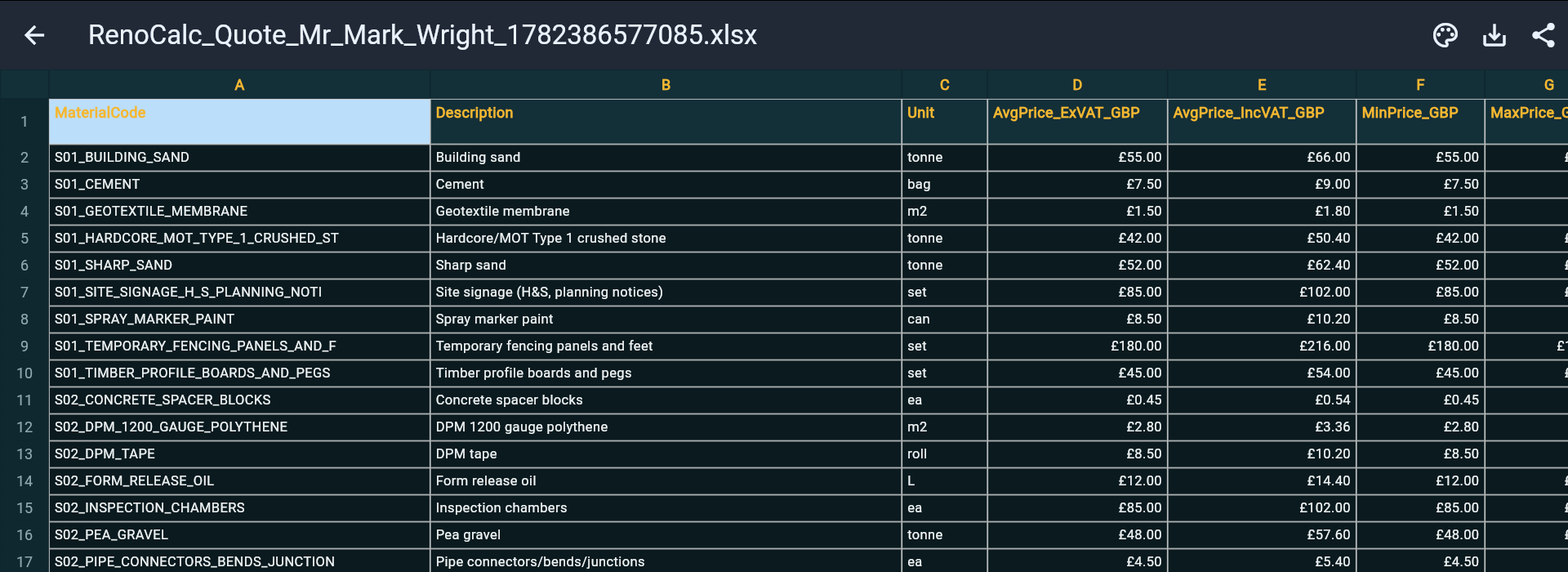
RenoCalc does not produce a simple table of numbers. It generates a RenoCalc Spreadsheet — a complete, formula-driven document with over 40,000 pre-built formulas covering every trade and every element of a renovation or construction project. The formulas are already correct. You are not typing numbers into cells or building formula logic — the document is generated with quantities calculated from your floor plan measurements and prices drawn from the built-in material price library.
The material price library is maintained to reflect current UK trade prices. You are not quoting with prices you last updated in March.
Generated From Your Actual Floor Plan
Upload your floor plan — a drawing, a PDF, a photograph of architect's plans — and RenoCalc reads the room dimensions, calculates areas and quantities for every trade, and populates the spreadsheet accordingly. You are not manually measuring and typing; the quantities come from the plan itself. This removes the single biggest source of quoting errors: measurement mistakes in manual data entry.
The Full Document Pack — Not Just a Spreadsheet
RenoCalc produces the complete quote pack alongside the spreadsheet:
- Cover letter — included free with every quote, professionally formatted and ready to send
- Schedule of works — trade-by-trade breakdown of everything included in the quote
- Method statements — site-specific method statements for the work described
- Contract pack — formal contract documents, reducing your legal exposure on every job
These documents are generated automatically — not written by hand after the spreadsheet is complete. A quote pack that would take a builder four to six hours of admin time is ready in under three minutes from the point of uploading the floor plan.
Pricing
RenoCalc is free to get started — your first quote is on us. Paid plans start at £9.99/month for individual builders, with professional tiers at £19.99/month and £74.99/month for larger operations. Enterprise pricing is available at £399.99/month. All plans include the RenoCalc Spreadsheet, cover letter, schedule of works and contract pack.
If you want to compare template options across different formats — Word, PDF and Excel — the building quote templates UK guide covers all three in detail. For a Word-format alternative, see building quote template Word. For a PDF output, see construction quote template PDF. For a worked example of a completed quote, see building quote example UK.
Start Free — Your First Quote Is On Us
Upload your floor plan and get a complete construction quote pack in under 3 minutes. RenoCalc Spreadsheet, cover letter, schedule of works and contract pack — all included.
Start Free at RenoCalcFrequently Asked Questions
Is there a free construction quote template for Microsoft Excel?
Yes. A basic construction quote template for Microsoft Excel should include columns for trade, description of work, materials cost, labour cost, quantity, unit rate and a total. You can build one from scratch or download a ready-made template. The key sections to include are: a header with your company details, trade breakdown tabs (groundworks, carpentry, plumbing, electrics, etc.), a materials vs labour split, VAT calculation, contingency row and a summary sheet. The checklist in this guide covers everything a solid template should contain.
Can I use Microsoft Excel for construction quoting?
Yes — Excel is widely used for construction quoting in the UK and it works well for simple jobs or single-trade work. The limitations become clear on larger projects: material prices are static (you have to update them manually), formulas can break if rows are inserted incorrectly, there is no automatic document generation, and version control becomes a problem when multiple people are editing the same file. For larger renovation or construction projects, a purpose-built quoting tool handles these problems automatically.
What tabs should a construction Excel quote template have?
A well-structured construction Excel quote template should have: (1) Summary sheet — totals by trade plus VAT and contingency; (2) Separate trade tabs — one per trade: groundworks, carpentry, blockwork, plastering, plumbing, electrics, tiling, decoration, etc.; (3) Materials tab — itemised list of materials with quantities, unit costs and supplier prices; (4) Labour tab — hours per trade and day rates; (5) Preliminaries tab — site setup, scaffolding, skips, welfare; (6) Cover sheet — client details, project address, quote reference number and validity period.
Why do formulas break in Excel construction templates?
Formulas in Excel construction templates typically break when rows are inserted or deleted within a range that the formula references. For example, a SUM formula referencing rows 10 to 40 will miss any rows inserted above row 40 but below the original last row, or will include a blank row and shift all references. This is a known problem with large construction spreadsheets — the more complex the template, the more fragile it becomes. Named ranges and structured table references reduce (but do not eliminate) this risk. For projects subject to CDM regulations, the HSE construction guidance highlights the importance of accurate pre-start cost documentation as part of responsible project planning.
What is the difference between an Excel construction quote template and what RenoCalc produces?
A standard Excel construction quote template is a static file you fill in manually — you type measurements, look up material prices and calculate totals yourself. The RenoCalc Spreadsheet is generated automatically from your actual floor plan: RenoCalc reads the dimensions, calculates quantities for every trade, applies live material prices from its built-in price library, and produces a complete, pre-populated spreadsheet with 40,000+ formulas already in place. You do not manually enter measurements or look up prices — the document is ready to review and send, along with a cover letter, schedule of works, method statements and contract pack.
Start Free — Your First Quote Is On Us
Upload your floor plan and RenoCalc produces a complete construction quote pack in under 3 minutes. RenoCalc Spreadsheet with 40,000+ pre-built formulas, cover letter, schedule of works, method statements and contract pack — all generated automatically.
Try RenoCalc Free