How RenoCalc's AI Calculates Your Renovation Quote
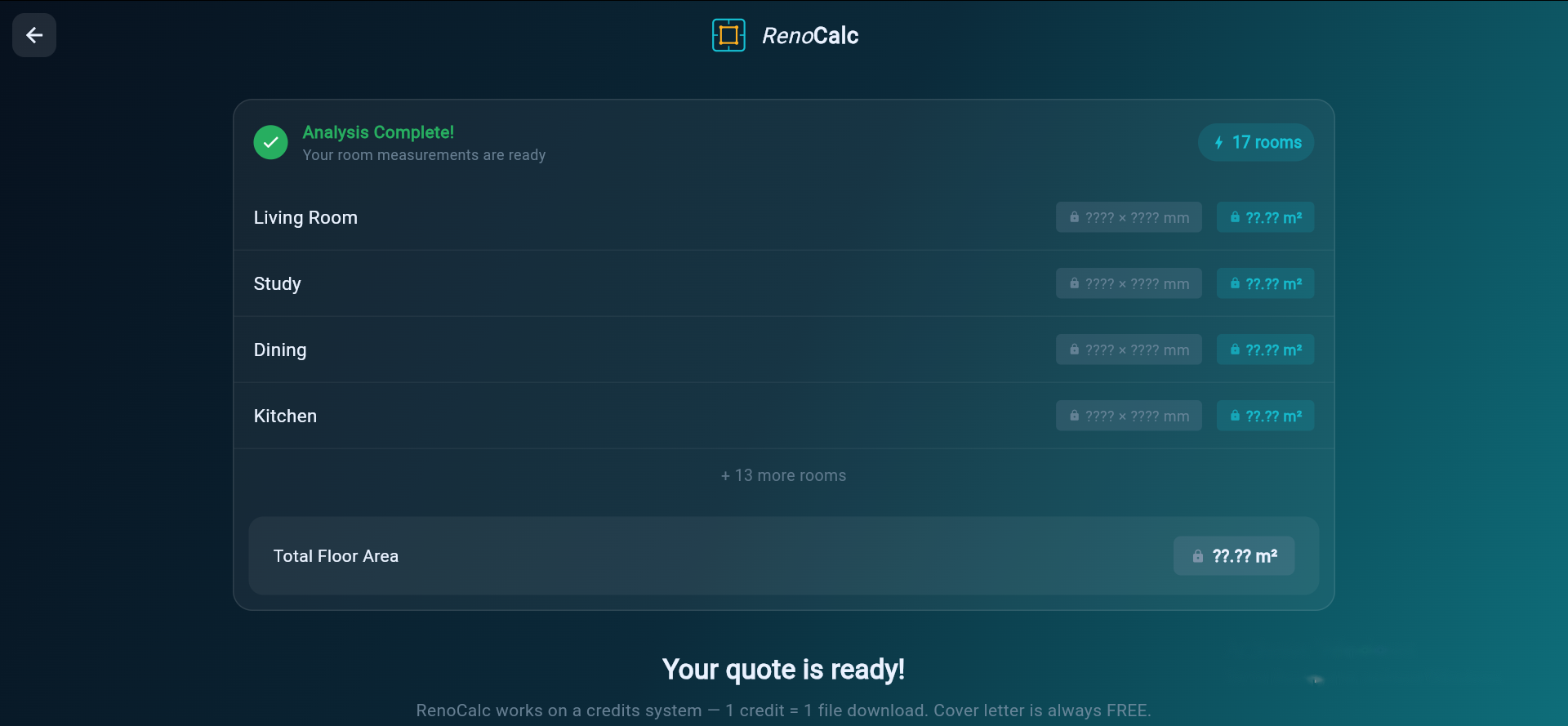
RenoCalc works in seven steps: you upload a floor plan, the AI analyses the image to identify rooms and features, you calibrate one known dimension, the system maps rooms to trades, calculates material quantities from floor areas and perimeters, prices everything against a live 40,000-item library, and generates five professional documents — all in under three minutes.
Step 1: Floor Plan Upload
The process starts with a floor plan. RenoCalc accepts a wide range of formats because builders work with whatever they have to hand — not always a precise architectural drawing.
Accepted formats include:
- PDF files (architect's drawings, planning documents, measured surveys)
- Photographs of paper plans taken on a phone
- Scanned drawings (flatbed scanner or document scanner)
- Hand-drawn sketches with room labels and approximate dimensions
- Estate agent floor plans, including those printed from Rightmove, Zoopla or OnTheMarket
- Architect's drawn plans at any scale
- As-built drawings from previous planning applications
The AI is designed to work with the reality of site-based estimating — which means working from estate agent plans, scanned drawings, or a quick sketch from a site visit, not only from precisely formatted CAD exports. The only requirement is that the image is clear enough to distinguish room boundaries, wall lines and openings.
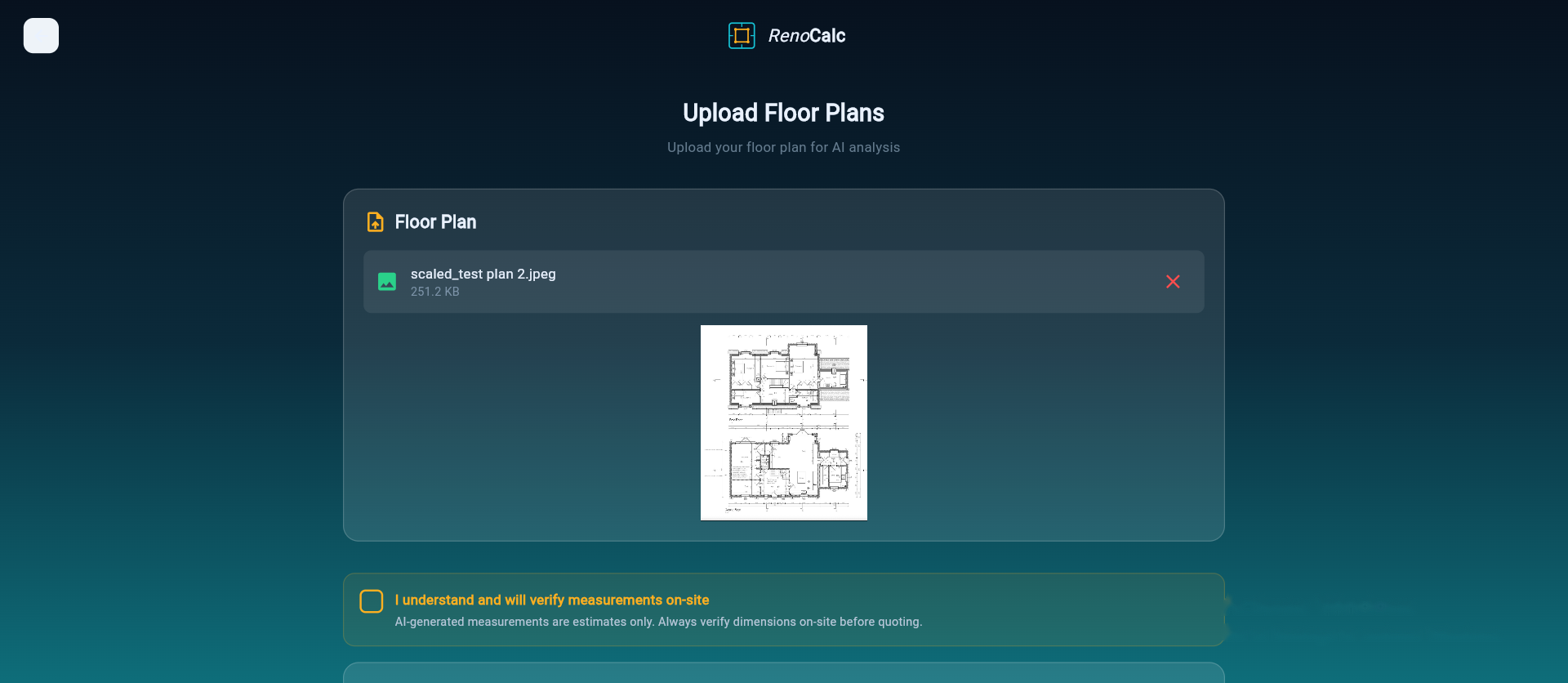
If you are uploading a multi-storey property, upload each floor separately. RenoCalc processes one floor at a time and combines the results into a single estimate at the output stage.
Step 2: AI Image Analysis
Once the floor plan is uploaded, RenoCalc's AI analyses the image to build a spatial model of the property. This is where the technology does the heavy lifting that would otherwise require you to count room by room with a scale rule.
The AI performs several detection tasks simultaneously:
Room Identification
The AI identifies enclosed spaces as individual rooms. It uses the geometry of the walls — the closed polygons formed by internal and external wall lines — to define each room boundary. Room labels are read where present (Kitchen, Bathroom, Living Room, Bedroom 1 and so on). Where labels are absent or illegible, the AI assigns a room type based on size, adjacency and context — a small room adjacent to a bedroom is more likely a bathroom or en suite than a second reception room, for example.
Feature Detection
Within each room, the AI identifies:
- Door openings and door swing direction
- Window positions and approximate width
- Internal partition walls and stud walls
- Structural elements such as chimney breasts or column positions where visible
- Wet room indicators (plumbing symbols, bath or WC outlines) that signal a bathroom or en suite
- Kitchen indicators (island outlines, appliance positions, cabinetry runs) that signal a kitchen
Wall Measurement
After identifying room boundaries, the AI estimates the dimensions of each wall by analysing the proportional geometry of the floor plan image. These initial measurements are in relative units — the AI knows that Wall A is twice the length of Wall B before it knows the actual length of either wall. Calibration in Step 3 converts these relative measurements into real-world dimensions.

What Affects Analysis Quality
The quality of the AI analysis depends on the quality of the uploaded image. High-contrast plans with clear wall lines and legible room labels produce the most accurate room detection. Faded photocopies, heavily annotated drawings or very small plans scanned at low resolution will produce less precise results. In all cases, users should verify the identified rooms and dimensions before generating the final quote.
Step 3: Dimension Calibration
After the AI has analysed the floor plan and produced its initial spatial model, users carry out a calibration step. This is a deliberate part of the process — not an optional extra — and it is what converts the AI's relative measurements into accurate real-world dimensions.
How Calibration Works
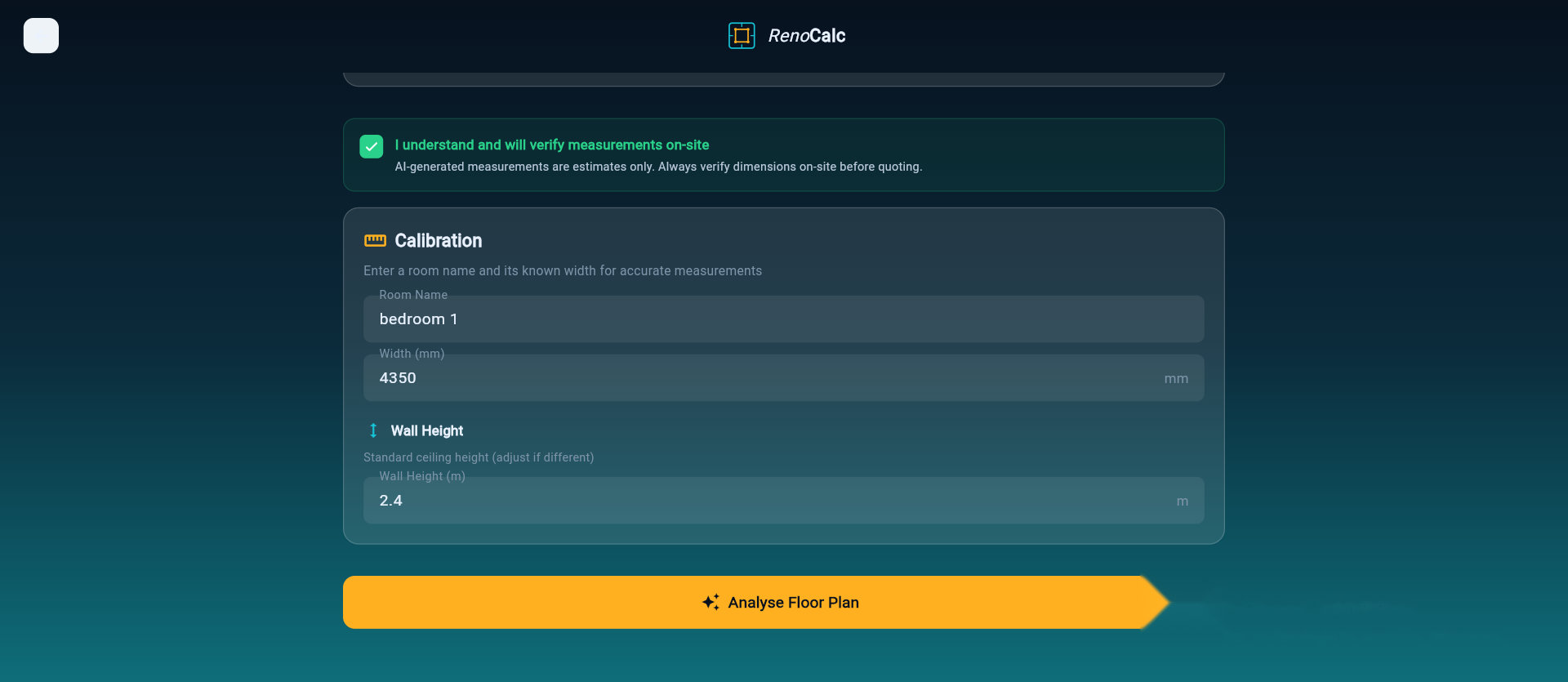
RenoCalc presents the analysed floor plan with a calibration tool overlaid. You select one known dimension — typically the overall length of the building, the width of the largest room, or a measurement you verified on site — and enter the real value. The system uses this anchor measurement to scale all other dimensions proportionally.
For example: if you enter that the kitchen is 4.2 metres wide, and the AI's analysis estimated it at 140 relative units wide, the system calculates that 1 relative unit equals 0.03 metres — and applies that scale factor to every other measurement in the model. A living room that the AI estimated at 180 relative units wide is now calculated as 5.4 metres wide.
Why One Measurement Is Enough
Assuming the floor plan was drawn to scale — which all estate agent plans, architect's drawings and measured surveys are — a single correctly entered measurement is sufficient to anchor the entire spatial model. The AI's analysis preserves the internal proportions of the original drawing; calibration simply converts those proportions from image pixels into real metres.
For hand-drawn sketches that may not be drawn to scale, additional calibration points can be entered to improve accuracy. The system allows up to three calibration measurements, and uses the average scaling factor where multiple measurements are provided.
Calibration and Accuracy
Calibration is the single most important step for improving the accuracy of the output quote. A well-calibrated floor plan from a to-scale estate agent plan will produce measurements within a few percent of actuals. An uncalibrated plan, or one calibrated against an incorrectly remembered dimension, will produce systematically inaccurate quantities throughout the estimate. Always verify at least one dimension on site before calibrating.
Step 4: Trade Calculation
With rooms identified and dimensions calibrated, the system maps each room to the trades that work is required. This is the logic layer that connects spatial data to construction knowledge — and it is where 32 years of site experience is embedded in the software.
Room-to-Trade Mapping
RenoCalc uses a rule-based system trained on real renovation projects to determine which trades are required in each room. A kitchen, for example, will typically require plastering, electrics (including a dedicated circuit for appliances), plumbing, tiling, decorating, joinery and kitchen fitting. A standard bedroom will require plastering, electrics, decorating, flooring and joinery (skirting, architraves, door).
The user selects the scope of work at the start of the process — full renovation, rooms selected individually, or a specific trade package. This scope selection filters the trade mapping: a plastering-only scope will generate only the plastering quantities across all rooms, not the full multi-trade breakdown.
Trade Sequencing
RenoCalc's trade mapping reflects the logical sequence of a renovation — not just a list of trades. The schedule of works output respects the dependency chain: strip out and structural work before first-fix services, first-fix before boarding, boarding before plastering, plastering before second-fix, second-fix before decoration, decoration before flooring and joinery. This sequencing is based on how work is actually done on site, not a textbook sequence.
Special Conditions
Certain room types trigger additional trade inclusions. A bathroom or en suite triggers tanking (waterproofing), tiling and sanitaryware fitting as well as the standard plumbing allocation. A kitchen triggers extraction ducting, worktop cutting and upstand tiling. A room identified as a utility or boot room triggers different sanitaryware and appliance allocations than a standard bathroom. The system handles the majority of common residential room types found in UK renovation projects.
Step 5: Material Quantity Calculation
Material quantities are calculated from the floor areas, wall areas and perimeter measurements derived from the calibrated spatial model. This is the takeoff stage — converting dimensions into the quantities of material needed to complete the work.
Floor Area Calculations
For trades that price by floor area — flooring, underfloor heating, floor screed, floor tiling — the AI-measured floor area is used directly. A waste factor is added to allow for cutting and fitting: typically 10% for ceramic and porcelain tiling, 8–12% for engineered or solid wood flooring depending on the laying direction, and 5% for sheet vinyl.
Wall Area Calculations
For trades that price by wall area — plastering, wall tiling, painting and decorating — the system calculates wall area from perimeter length multiplied by room height. Standard ceiling heights (2.4m for most post-war residential, 2.7m for Victorian and Edwardian properties) are applied as a default and can be adjusted by the user. Door and window openings are deducted from gross wall area to give net area for pricing.
Linear Quantity Calculations
For trades that price linearly — skirting board, architrave, coving, pipe runs, cable runs — the system calculates perimeter lengths per room. Pipe and cable runs are estimated with an additional routing allowance to account for drops to sockets and connections at appliances.
Item Count Calculations
For items priced per unit — sockets, light fittings, radiators, door sets, sanitaryware items — the system applies a standard density based on room type and floor area. A living room of 20 square metres would typically receive a certain number of double sockets; the system's defaults are based on current Part P and building regulations guidance, adjusted by the project scope selected.
Waste Factors
Waste factors are applied to all material quantities — not to labour. The waste factors used by RenoCalc are based on real-world purchasing patterns, not textbook theory. Plastering materials carry a 5% waste allowance. Blockwork carries 10%. Ceramic and porcelain tiles carry 10%. These are the factors a builder actually needs to order the right quantity and not run short on site.
Step 6: Pricing
With quantities calculated, the system applies pricing from two sources: a live material price library and a set of regional labour rates.
The Material Price Library
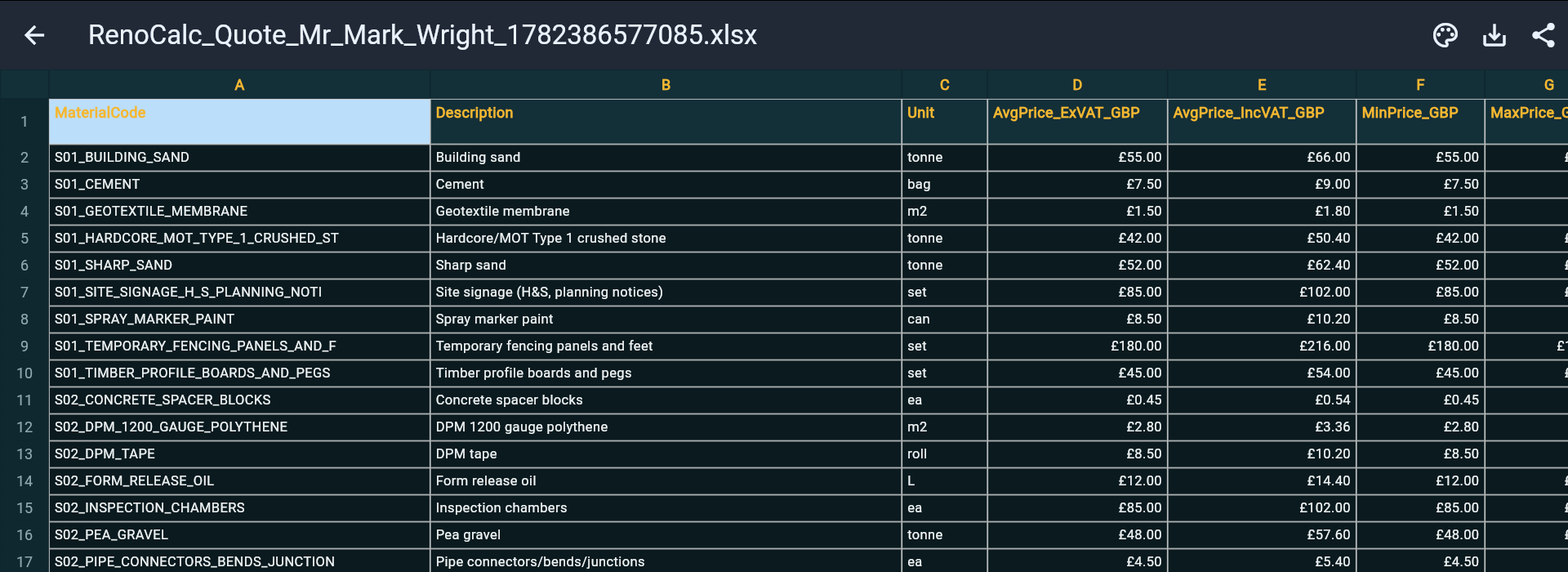
RenoCalc's material price library contains over 40,000 priced items covering every trade and material type used in UK residential renovation. Prices are maintained at trade purchase rates — what a builder buys materials for from a merchant account — not retail prices. This is a fundamental distinction. A builder quoting a job needs to know their material cost at trade, not the price a homeowner would pay at B&Q.
The library covers materials at the specification level used on UK residential projects: plasterboard types and thicknesses, plaster skim and basecoat products, cable specifications, pipe materials and fittings, tile types and adhesive specifications, paint types and primer requirements, flooring products by type and thickness, joinery items by profile and material. The depth of the library reflects 32 years of purchasing experience — not a generic price book.
Regional Labour Rates
Labour rates vary significantly across the UK. A plasterer in inner London charges materially more per square metre than the same trade in the Midlands or the North. RenoCalc applies regional labour rate factors based on the project location entered by the user. The base rates reflect Midlands pricing — where the software was built and calibrated — with uplift factors applied for London (25–35%), the South East (15–20%), the South West (5–10%), and reductions for the North East and parts of Northern England and Scotland.
Overhead and Margin
RenoCalc does not apply a fixed overhead or margin to the output. This is a deliberate choice. Every building business has a different cost structure, and the margin needed on a job depends on the builder's own overheads, the competitive situation, and the complexity of the project. The system produces a net cost estimate — materials plus labour at regional rates — and leaves the margin decision to the professional using it.
Step 7: Document Generation
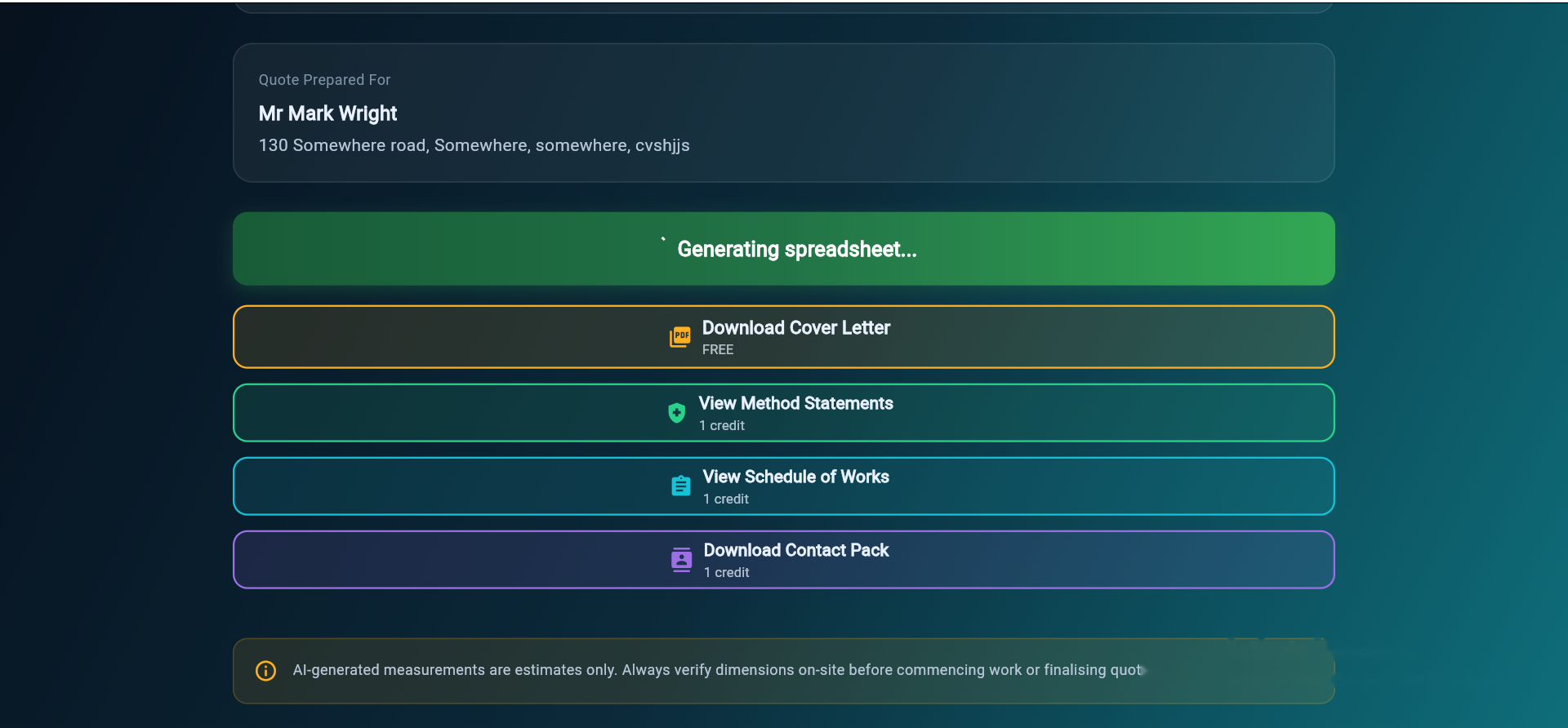
The final step converts the priced estimate into five professional documents, all generated from a single floor plan upload.
Document 1: Excel Estimate Spreadsheet
The primary output is an Excel workbook containing the full trade-by-trade cost breakdown. Each row contains: room reference, trade, item description, quantity, unit of measure, material rate, labour rate and total cost. The workbook is built on live formulas — all 40,000-plus of them — so you can adjust rates, quantities and scope directly in Excel. The workbook is structured with separate sheets for each trade and a summary sheet showing the total by trade and by room.
Document 2: Cover Letter
A professionally formatted cover letter addressed to the client, summarising the scope of works, total cost and payment terms. The letter is branded with the contractor's details and presented in a format ready to email or print. It reads like a letter written by a builder, not a form letter generated by software.
Document 3: Schedule of Works
A phased programme broken down by trade and by room. The schedule reflects the correct sequencing of trades — structural, first-fix services, boarding, plastering, second-fix, decoration, flooring, joinery — and includes indicative durations for each phase. The schedule gives the client a clear picture of how the project will be managed and gives the contractor a programme to work to.
Document 4: Method Statements
HSE-aligned method statements for all trades included in the scope of works. Method statements set out how each trade operation will be carried out safely, including the PPE required, the tools and equipment to be used, and the site safety measures in place. The method statements generated by RenoCalc meet the requirements for domestic renovation projects under current health and safety legislation.
Document 5: Contract Pack
A 12-page domestic building contract pack incorporating the contractor and client details, the scope of works, the contract sum, payment terms and programme. The template follows standard JCT domestic contract structure and is ready for both parties to review and sign before work commences — as with any contract template, we recommend a solicitor checks it for bespoke or high-value jobs. Using a written contract protects both the contractor and the client.
Honest Accuracy: What the AI Can and Cannot Do
RenoCalc is built to be fast and to produce professional-quality output — but it is important to be clear about what the AI measurement process can and cannot guarantee.
AI Measurements Are Estimates
The AI derives dimensions from an image, not from a physical survey. Even after calibration, the measurements are estimates. Walls are not always straight. Rooms are not always rectangular. Hand-drawn plans may not be accurately proportioned. Estate agent plans are produced for marketing purposes and may simplify or approximate the geometry of the property.
For a property you have visited, you know roughly what the rooms are. A living room shown as 4.8 metres long by 3.6 metres wide is a reasonable estimate — but before you commit that to a quote, you should verify the critical dimensions on site. A tape measure on site takes five minutes. The cost of under-quoting on materials because the AI overestimated a room size by 8% can run to hundreds of pounds on a full renovation.
Always Verify on Site
RenoCalc's position is clear: AI measurements should be treated as a starting point for your estimate, not as a substitute for a site visit and on-site measurement. The software saves the hours it would otherwise take to build a priced schedule from scratch — but it does not remove the professional responsibility of the builder to verify the information before signing a contract.
For complex properties, irregular room shapes, or projects where quantities are tightly margined, site measurement remains essential. RenoCalc is most powerful when used alongside a site visit — not instead of one.
What RenoCalc Is For
RenoCalc is designed to solve a specific, real problem: the hours a builder spends building a detailed priced estimate from scratch, for every job they quote. That process — counting rooms, measuring dimensions, writing up quantities, looking up material prices, typing up a spreadsheet, writing a cover letter, drafting a contract — takes a half-day or more for a full renovation quote. RenoCalc compresses it to under three minutes.
What you do with those hours is your business. Price more jobs. Spend more time on site. Provide a better service to your clients. The point is that the hours are yours again.
Frequently Asked Questions
How accurate are RenoCalc's AI measurements?
AI-derived measurements are estimates based on image analysis, not a physical survey. Accuracy depends on the quality and scale of the floor plan submitted. After uploading, users calibrate one known dimension — typically a room length or overall building width — which anchors the AI's spatial model to real-world scale. Even after calibration, measurements should be verified on site before you commit a quote to a client. RenoCalc is designed to get you to 90–95% accuracy quickly, with final verification done by you.
What floor plan formats does RenoCalc accept?
RenoCalc accepts PDF files, photographs of paper plans, scanned drawings, hand-drawn sketches, estate agent floor plans (including those printed from Rightmove or Zoopla), and architect's drawings. The AI works with any clear image that shows room layouts and wall positions — it does not require a CAD file or a technically precise drawing.
How does the AI identify rooms and features?
RenoCalc's AI analyses the visual structure of the floor plan image — identifying enclosed spaces as rooms, recognising door openings and window positions, detecting internal partitions and walls, and reading room labels where present. The system has been trained on thousands of UK residential floor plans covering a range of drawing styles and scales.
What trades does RenoCalc calculate quantities for?
RenoCalc calculates quantities for all primary renovation trades: plastering, electrics, plumbing and heating, tiling, decorating, flooring, joinery, stud partitions, carpentry, kitchen fitting, bathroom fitting and groundworks or structural works where indicated. The system maps each identified room to the trades typically required based on the room type and user-selected scope.
How does the material price library stay current?
The material price library covers 40,000-plus priced items and is maintained by the RenoCalc team using current UK merchant and trade supplier pricing. Regional labour rate uplifts are applied based on the project location selected by the user. Prices reflect trade purchase rates — not retail — because the system is built for builders, not consumers.
What are the five documents RenoCalc produces?
RenoCalc generates five documents from a single floor plan upload: (1) an Excel spreadsheet with a full trade-by-trade cost breakdown including quantities, units, rates and totals; (2) a branded cover letter ready to send to the client; (3) a schedule of works with a phased programme broken down by trade; (4) HSE-aligned method statements for all trades included in the scope; and (5) a 12-page domestic building contract pack ready for signature.
See It Working on Your Floor Plan
Upload any floor plan — estate agent, architect's drawing, or a photo of a sketch — and see the AI analysis, calibration and quote generation in action. No card required.
Try Free — No Card Needed